

Why you can trust it
Force data is only useful if the numbers are right and their limits are known. This page is for the person who has to decide whether to build on the SDK: what makes it reliable, what was measured, and what is still open. We would rather tell you what we have not checked than have you find out in your data.
One contract, three languages, the same test data
Section titled “One contract, three languages, the same test data”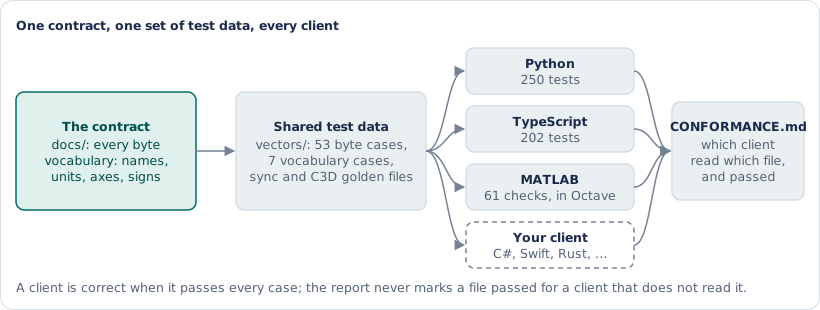
The SDK starts from a written contract, not from a client library. The reference describes every byte the FDT sends and accepts, and the vocabulary fixes the names, units, axes and signs every client must produce. From that contract come shared test files (vectors/): 53 byte-level cases for framing, the stream, status replies, the version probe and the checksum, 7 vocabulary cases that turn frames into samples, gaps and events, plus golden files for sync events and for the C3D writer. Each case is an input and the exact output it must give.
The Python and TypeScript clients run all of those files in their own test suites; the MATLAB toolbox runs the checksum, stream, vocabulary and sync files, the parts it uses; the C3D golden file is read by the Python writer’s tests. A generated report, CONFORMANCE.md, says for each file and each client whether it was read and passed, and never marks a file as passed for a client that does not read it. Today: Python 250 tests, TypeScript 202, MATLAB (run in GNU Octave) 61 checks, all passing. A Python test that needs an optional library (pyserial, bleak, ezc3d, pylsl) is skipped when that library is not installed, and says which one.
So a team that writes its own client, in C#, Swift or Rust, has a finish line: pass the same vectors and it decodes the FDT exactly as the reference clients do.
Measured against independent references
Section titled “Measured against independent references”| Check | Reference | Result |
|---|---|---|
| Centre of pressure from forces and moments | Studio’s CoP columns on two real exports | 0.28 mm rms (measured) |
| Combined centre of pressure of two plates | Studio’s combined columns | 0.29 mm rms (measured) |
| C3D files read back by ezc3d, the C3D library OpenSim uses | Studio’s CSV of the same recording | 0.24 to 0.29 mm rms, worst sample 0.50 mm (measured) |
| Analog outputs (FDTs with the analog board) | A meter on the output pins against the digital values | within 1 % at 164 N and 24.6 N·m, one unit (measured by the hardware maker) |
| 2,000 samples per second per plate over USB | Frame counters on the FDT, firmware 1.2.8.1 and later | no frame lost (measured with the firmware team’s tools) |
| 2,000 samples per second per plate with this SDK | The simulator over a pseudo-terminal, two plates | no sample lost (simulated) |
| Lab Streaming Layer timing | The simulator into a local LSL inlet, with clock drift | drift 0.13 ppm, residual 0.012 ms (simulated) |
One finding came out of this work: a standard C3D reader places the centre of pressure in Studio’s own C3D export 26 to 51 mm away from Studio’s CSV, because of where that file puts the plate origin (measured with ezc3d). The SDK’s writer moves the moments to the plate surface and sets the origin explicitly, which is why its files land within half a millimetre.
Safe by construction
Section titled “Safe by construction”The FDT also accepts commands that update firmware, write calibration, reset the device or change how the plates are polled. The clients cannot send them. They implement eight commands (start, stop, status, firmware version, keep-alive, sample rate, and the two sync-mode commands), and every other code is listed in commands.py and commands.ts with the reason it is left out; asking for one raises an error before a byte is written. Through these clients an application can start and stop the stream and set the sample rate, the sleep timer and the sync mode; it cannot update firmware, write calibration or re-zero the plates.
Nothing hidden
Section titled “Nothing hidden”- Time comes from the FDT’s own clock, not from when the computer happened to read the data, so USB or Bluetooth jitter does not move a sample.
- Gaps are reported, never filled. A missing stretch shows up as a
Gapwith its length; the files say where it was. Some exports smooth a hole over with a uniform time grid; this SDK does not. - Every result from the Cloud names its method and version, so a number can be traced to the calculation that made it.
Small and inspectable
Section titled “Small and inspectable”The Python core uses only the standard library; USB, Bluetooth, C3D and LSL support are optional extras that load only when used. The TypeScript client has no runtime dependencies. The MATLAB toolbox is plain MATLAB files. Everything is Apache 2.0, in one repository, with the tests next to the code.
Not yet done
Section titled “Not yet done”| Part | Status |
|---|---|
| This SDK version against a real FDT | Not yet: the clients have run against the simulator, recorded bytes and real Studio exports |
| MATLAB itself | Tested in GNU Octave 8, not yet in MATLAB |
| Browser (Web Serial, Web Bluetooth) | Written and unit-tested; not yet run with a device |
| Excel workbook | Built and its Power Query code read through; not yet opened in Excel itself |
Sign of fy and mx |
Follows Studio’s configuration; not yet checked with one known off-centre load on both sides |
| OpenSim force direction | Round trip and axis mapping simulated; not yet checked with a known horizontal load |
| Sync modes (start on trigger, event frames) | A firmware draft; the SDK finds them by asking the FDT, not by version number |
Each page in these docs carries its own “Tested on” line with the same three words: measured (on real hardware or real recordings), simulated (on the simulator), or not yet.